If your Account A (Production) trusts Account B (Shared Services or Dev), your audit boundary does not stop at the Account A login screen. It extends deep into Account B's governance.
If you are not looking at who can assume those roles, you are not actually auditing access — you are just looking at a list of names while the real actors are coming through the side door.
How Cross‑Account IAM Role Trust Actually Works (The Two‑Way Handshake)
To audit this effectively, you must understand that cross-account access is not a single permission; it is a two-way handshake. If one side is missing, access fails. If both are present, your audit scope just expanded.
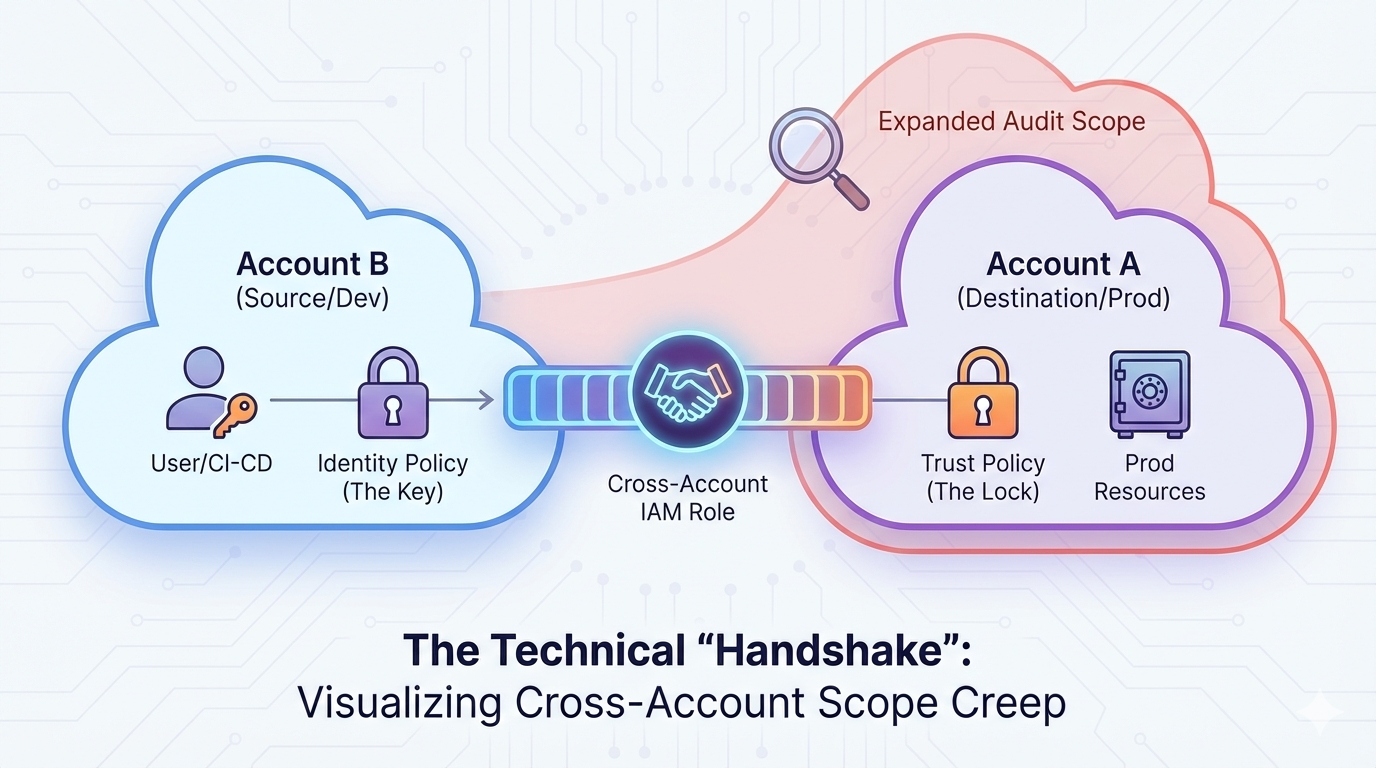
Cross-account access requires both a trust policy in the destination account and an identity policy in the source account.
1. The Trust Policy (The “Lock”)
This lives in the Destination Account (for example, your sensitive Production account). It defines which external entities are allowed to “knock on the door.”
- What to look for: A JSON block called the
Principal. - The Auditor's Warning: If the Principal is
arn:aws:iam::123456789012:root, the account has effectively handed a master key to the entirety of the other account.
2. The Identity Policy (The “Key”)
This lives in the Source Account (e.g., a Management or Dev account). It grants a specific user or service the permission to perform sts:AssumeRole.
- What to look for: A policy that references the ARN of the role in the destination account.
The Auditor’s Rule of Thumb: Access is defined by who can assume a role — not by who “exists” in the account.
3 Critical Blind Spots That Break AWS Audit Accuracy
1. The “No IAM Users” Trap (SSO/Federation)
Modern AWS environments rely on external identity providers such as Okta, Azure AD, or AWS IAM Identity Center. Users log into a Hub account, then hop to Production via roles. If you only request a list of IAM users in Production, you miss every real human actor.
2. The CI/CD “Backdoor”
GitHub Actions, GitLab Runners, and Jenkins pipelines often live in Shared Services accounts and use IAM roles to deploy to Production. This makes the pipeline itself a privileged identity. If a junior developer can modify the pipeline, they effectively control Production.
3. Role Chaining (Transitive Access)
AWS allows “Role Chaining,” where User A assumes Role B, which then assumes Role C. Auditors frequently stop at the first hop. You must trace the chain to the originating human or workload identity.
How to Audit AWS Cross‑Account Access Correctly
To avoid under-scoping your audit, enhance your evidence requests with these steps:
- Follow the Trust: Request Trust Policies for all high‑risk roles (AdminAccess, S3, RDS, DynamoDB).
- Validate the Origin: If a role is assumed from another account, review the IAM policies in the source account.
- Audit the IdP: With SSO environments, the true user inventory lives in Okta/Azure AD — not Production.
Summary: What Auditors Must Verify
Cross‑account IAM roles introduce hidden access pathways that silently expand your AWS audit boundary. To scope accurately, auditors must:
- Review trust policies for external or wildcard principals.
- Confirm identity policies authorizing
sts:AssumeRole. - Trace transitive role-chaining paths.
- Map human identities back to the IdP.
How Blackbox Auditor Solves the “Trust” Problem
Mapping out cross-account relationships manually is nearly impossible in environments with dozens of AWS accounts. Most auditors never see the full trust web without tooling.
Blackbox Auditor gives auditors and GRC teams complete visibility:
- Visualizes the Trust Web: See all trust relationships and detect high-risk
roottrusts instantly. - Flags Over‑Privileged Roles: Automatically identifies cross-account roles with AdministratorAccess or other dangerous permissions.
- Audit‑Ready Reports: Clear, plain‑English role/identity mappings designed for internal stakeholders and external assessors.
Stop guessing where your audit boundary ends — see the real privilege pathways inside your AWS organization.
Ready to simplify your next AWS audit?
Contact the Blackbox Auditor Team today.
Frequently Asked Questions
What makes cross‑account IAM roles an audit risk?
They enable users or services in one AWS account to access another, often without clear logging or visibility for auditors.
How can auditors detect role chaining?
Review CloudTrail AssumeRole events and trace the ARN lineage across hops until you reach a human or workload identity.
Why is SSO a blind spot?
Because the true “user list” lives in the identity provider, not the AWS account you are auditing.
Which roles require mandatory trust policy review?
Any role with AdministratorAccess, cross-account access, or data-layer permissions.